Mozilla Firefox - KI Funktionen abschalten
12.05.2026 |
In Anlehnung an den vorherigen Artikel:
weights.bin - Google Chrome - KI Funktionen abschalten
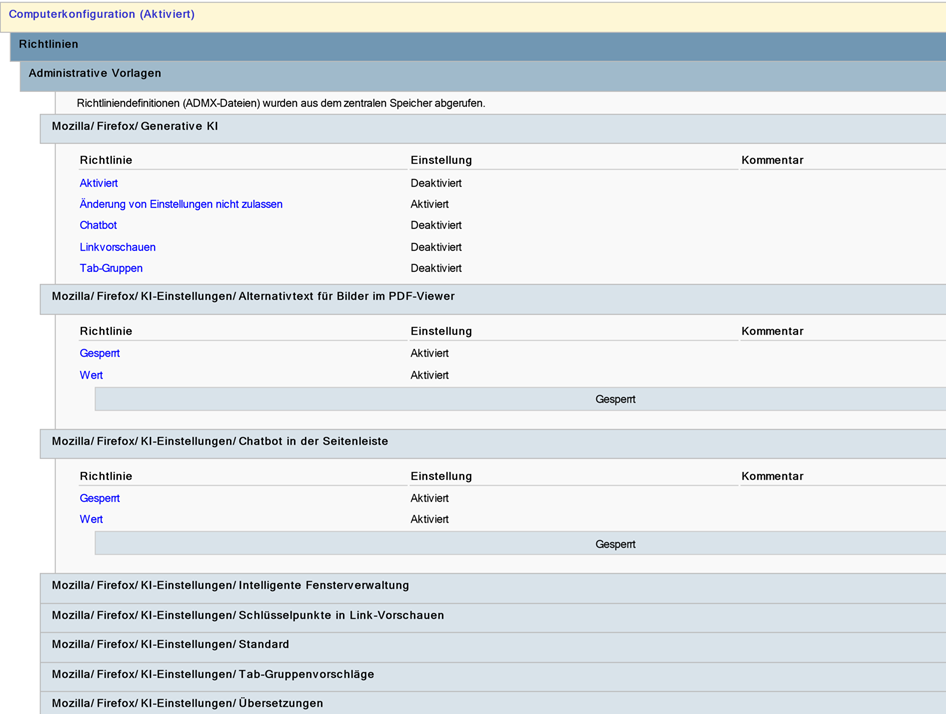
Da wir die Tage die KI Funktionen in Edge und Chrome abgeschaltet haben, sollten wir uns die Mühe auch für Mozilla Firefox machen. Ich mache es wieder per Powershell Integration in der GPO, da es schneller geht.
$Name="C_Browser_Firefox"

$All0=
"Enabled",
"Chatbot",
"LinkPreviews",
“TabGroups”

foreach ($value in $All0) {
   Set-GPRegistryValue -Name $Name -Key "HKLM\Software\Policies\Mozilla\Firefox\GenerativeAI" -ValueName $Value -Value 0 -Type DWord
}
Set-GPRegistryValue -Name $Name -Key "HKLM\Software\Policies\Mozilla\Firefox\GenerativeAI" -ValueName Locked -Value 1 -Type DWord

$AllPath=
"HKLM\Software\Policies\Mozilla\Firefox\AIControls\PDFAltText",
"HKLM\Software\Policies\Mozilla\Firefox\AIControls\SidebarChatbot",
"HKLM\Software\Policies\Mozilla\Firefox\AIControls\SmartWindow",
"HKLM\Software\Policies\Mozilla\Firefox\AIControls\LinkPreviewKeyPoints",
"HKLM\Software\Policies\Mozilla\Firefox\AIControls\Default",
"HKLM\Software\Policies\Mozilla\Firefox\AIControls\SmartTabGroups",
“HKLM\Software\Policies\Mozilla\Firefox\AIControls\Translations”

foreach ($Path in $AllPath) {
   Set-GPRegistryValue -Name $Name -Key $Path -ValueName Locked -Value 1 -Type DWord
   Set-GPRegistryValue -Name $Name -Key $Path -ValueName Value -Value "blocked" -Type String
}